


Wispr Flow is an AI-powered dictation tool that turns spoken thoughts into clear, polished writing across apps and websites. It automatically removes filler words, improves sentence structure, and formats your ideas as you speak, making it easier to write emails, documents, notes, and content faster without typing everything manually.
What Is Wispr Flow?
Wispr Flow is a voice-to-text application that runs across your computer and phone. You activate it, speak normally, and it inserts the resulting text into the field where your cursor is positioned.
The company currently offers the application on Mac, Windows, iPhone, and Android, although I have only personally tested the Mac and iPhone versions. (source)
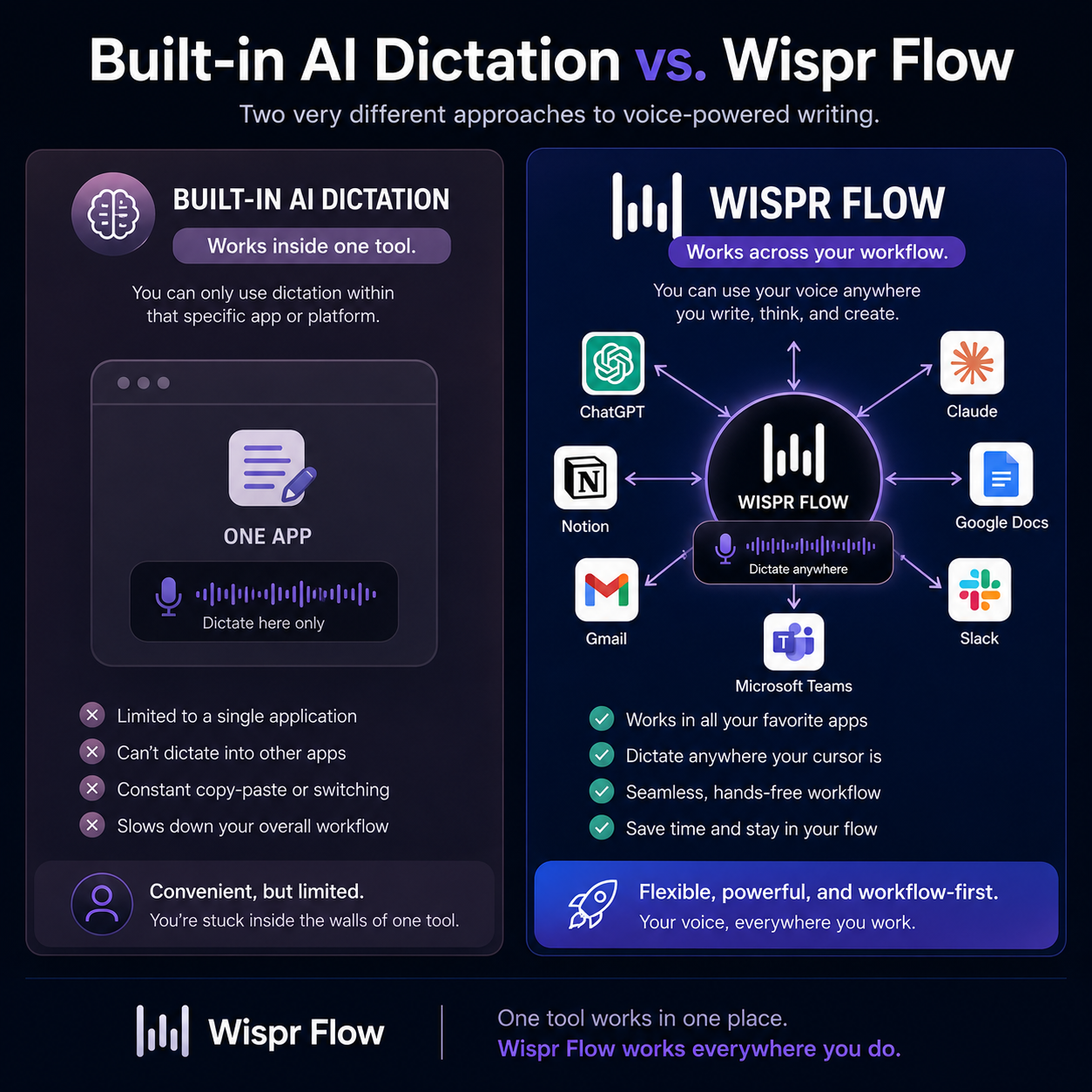
That cross-application support is what separates it from the microphone inside ChatGPT or Claude. Those tools can understand your voice well, but their dictation features stay inside their own applications.
Wispr Flow follows you into emails, text messages, website editors, documents, AI tools, and other text fields.
It Does More Than Transcribe Your Words
Basic dictation software tries to reproduce exactly what you say. Wispr Flow also cleans up how you said it.
It can remove filler words, add punctuation, recognize self-corrections, and format the result based on the context. The goal is to turn natural speech into something that reads more like intentional writing.
That matters because most people do not speak in perfectly structured paragraphs. We pause, repeat ourselves, change direction, and use filler words while thinking. Wispr Flow removes much of that mess before the text reaches the page.

My Experience After Dictating More Than 227,000 Words
I started on Wispr Flow’s free plan because I was not convinced I needed to pay for voice dictation.
At the time, I was already using the microphones inside ChatGPT and Claude. They worked well enough for prompts, so paying for another tool initially seemed unnecessary.
My opinion changed once I started using Wispr Flow outside those applications.
I could dictate an email, switch over to a client message, open ChatGPT, and then work inside a website without changing how I captured my thoughts. Wispr Flow became less like a feature inside one tool and more like a replacement for my keyboard.
I reached the free allowance within a couple of weeks and upgraded to the $15 monthly Pro plan.
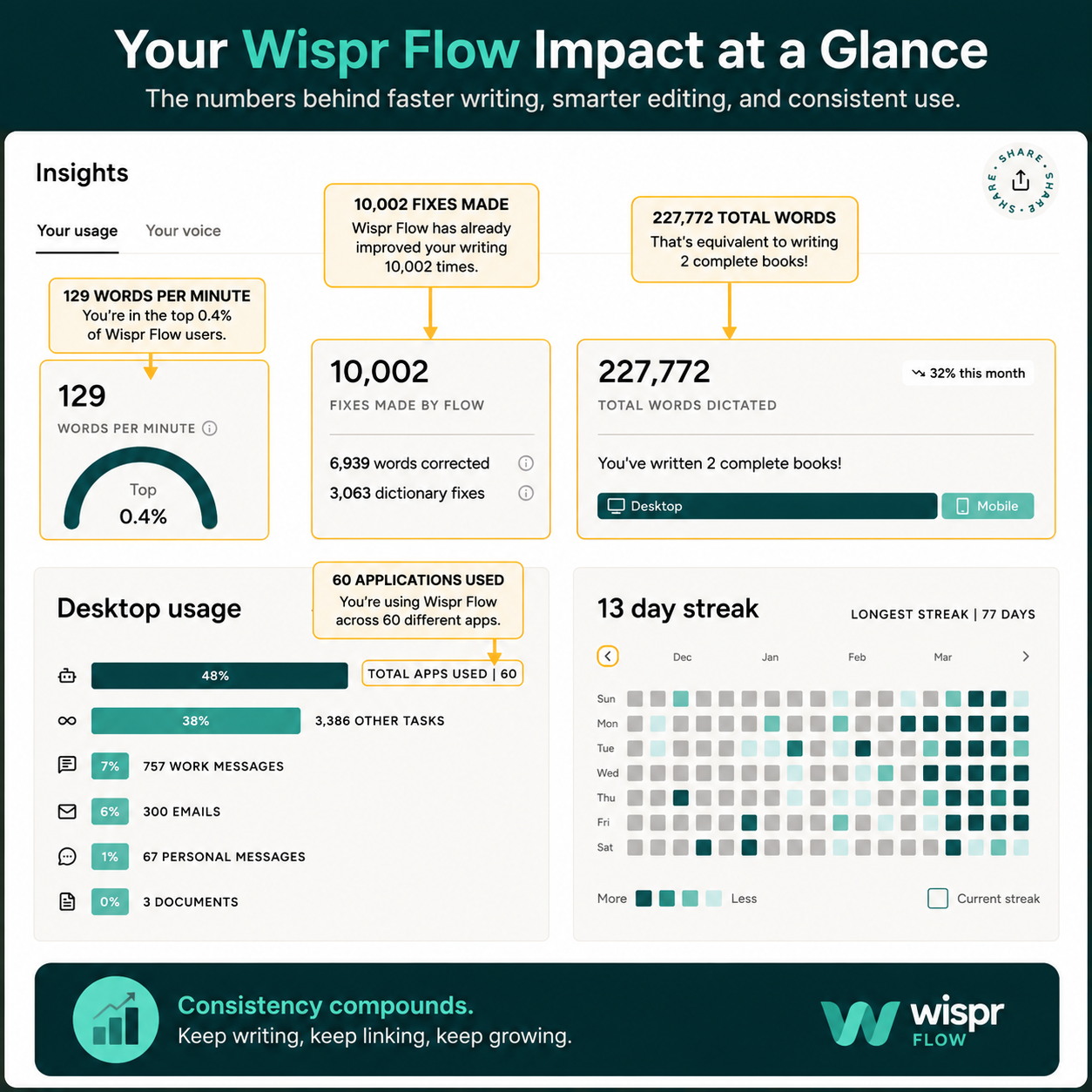
At the time I captured my usage dashboard for this review, I had dictated 227,772 words at an average speed of 129 words per minute. Wispr Flow had made 10,002 fixes, including 6,939 word corrections and 3,063 dictionary fixes.
The dashboard also showed usage across 60 desktop applications. AI prompting was my largest category, but I had also used it for thousands of other tasks, hundreds of work messages, and hundreds of emails.
Those numbers matter because this review is not based on testing the application for an afternoon. Wispr Flow has been part of my daily workflow for roughly four months.
How Much Time Does It Save?
Something that might take me 10 minutes to type can sometimes take around 30 seconds to say.
That is not a controlled typing benchmark, and the exact difference depends on what I am creating. The important part is how often that saving occurs.
I use Wispr Flow to:
- Explain detailed ideas to ChatGPT and Claude
- Draft emails for clients
- Write work messages
- Capture ideas for articles
- Communicate through text
- Work on websites and online businesses
- Give AI enough context to produce a useful result
One short prompt does not save much time. Dozens of prompts, messages, corrections, and emails across an entire day are different.
The larger benefit is that I can get the complete idea out while I am thinking about it. I do not have to stop, translate the thought into perfectly typed sentences, and then continue. I speak the raw idea, let Wispr Flow clean it up, and use AI when the result needs more structure.
The Wispr Flow Features That Actually Matter
Wispr Flow has more features than most people will need. These are the ones that have made the biggest difference in my workflow.
Accurate Dictation With Automatic Cleanup
Accuracy was my first concern, but Wispr Flow gets surprisingly little wrong in my everyday use.
It handles punctuation well and removes filler words that would make a raw transcript difficult to read. I can speak naturally rather than mentally composing every sentence before I start.
Depending on your settings, the result can occasionally sound more formal than you intended. That has not been a serious problem for me because the tone can be adjusted, and much of my dictation is going into AI tools for another round of editing anyway.
I would rather slightly soften a clean transcript than manually repair a paragraph filled with pauses, repeated phrases, and unfinished thoughts.
It Works Across My Applications
This is the main reason I pay for Wispr Flow.
ChatGPT and Claude already have good voice-input options, but they only solve dictation inside ChatGPT and Claude. Wispr Flow is effectively app-agnostic.
I use the same tool for AI prompts, emails, client texts, website content, work messages, and general writing. Wispr Flow says it can insert dictation into any app, browser, or text field. (source)
I would not promise flawless compatibility with every obscure application ever created. However, after using it across 60 desktop apps, compatibility has not been a practical concern for me.
It Learns Names and Technical Terms
Wispr Flow becomes more useful as it gets familiar with the vocabulary you use.
When it gets a name or unusual term wrong, I can correct the spelling. With automatic dictionary learning enabled, Flow can recognize specialized words from those corrections and add them to the personal dictionary. Users can also add names, acronyms, product names, and replacement rules manually. (source)
That is valuable when your work includes brand names, website terminology, client names, or technical language that ordinary dictation tools may misunderstand.
Context-Aware Tone and Formatting
Wispr Flow changes how it formats text based partly on where you are writing.
An email may come out more polished, while a personal message can sound more casual. Wispr says it uses information about the active application and surrounding text to help determine tone, capitalization, and punctuation. Context Awareness can be disabled in the privacy settings. (source)
This is generally helpful, although it explains why the occasional result can feel more formal than expected.
Command Mode
Pro users can also highlight text and issue spoken commands such as “make this more concise” or “translate this.” Command Mode is currently available on Mac and Windows and requires a paid plan or an active trial. (source)
It is a useful addition, but I would not buy Wispr Flow for Command Mode alone. The everyday value still comes from fast, accurate dictation across applications.
Wispr Flow vs Free Dictation Tools
The fairest comparison is not Wispr Flow against typing. It is Wispr Flow against the free dictation you already have.
Wispr Flow vs ChatGPT and Claude Dictation
The voice-input tools inside ChatGPT and Claude are good for speaking directly to those AI platforms.
Someone who only uses dictation for an occasional prompt may not need anything else.
Wispr Flow becomes more valuable when AI is only one part of your workflow. I can dictate a prompt, move to an email, answer a client, and work inside another application without switching dictation systems.
That continuity is what I am paying for.
Wispr Flow vs Apple Dictation
Apple’s built-in dictation has never been reliable enough for me to make it part of my workflow.
My experience with Wispr Flow has been noticeably better, both in recognition accuracy and in the quality of the finished text. Wispr Flow also removes filler words, formats the result, and learns terminology I use repeatedly.
That does not mean every Apple user will have the same experience. The free option is still worth trying first. In my case, though, Apple Dictation never made me want to stop typing. Wispr Flow did.
Where Wispr Flow Falls Short
I have had very few technical complaints, but there are practical limitations.
You Need Somewhere Comfortable to Speak
Voice dictation works best when you have enough privacy to say your thoughts out loud.
I do not want everyone in a public place or shared room listening to my client messages, work emails, or AI prompts. Wispr Flow does a good job of picking up my voice in noisy environments, but noise and privacy are two different issues.
Sometimes typing is simply more appropriate.
It Does Not Replace Every Kind of Typing
I still use the keyboard for passwords, precise code, and short corrections.
Dictation is excellent for communicating ideas. It is less suitable when every character has to be exact.
The Flow Bar Used to Get in the Way
My main interface complaint was the placement of the Flow Bar. It could sit in the way of whatever I was working on.
A later update added the ability to move it, which largely solved the problem. I appreciate that the company addressed something users were actively complaining about rather than treating the interface as finished.
It Requires an Internet Connection
Wispr Flow requires an internet connection for transcription. (source)
That has not caused meaningful problems in my normal workflow, but it matters for people who need reliable offline dictation or frequently work with unstable connections.
Wispr Flow Pricing
For individual users, the decision is mainly between Basic and Pro.
| Plan | Current price | Best for |
|---|---|---|
| Basic | Free | Testing Wispr Flow or dictating occasionally |
| Pro | $15 per month or $12 per month billed annually | Frequent individual users |
| Enterprise | Custom pricing | Organizations needing advanced security, administration, and support |
The free plan includes 2,000 words per week on Mac or Windows and 1,000 words per week on iPhone. At the time of writing, Android has unlimited free words as a limited-time offer.
Pro includes unlimited dictation across Mac, Windows, iPhone, and Android, along with Command Mode, priority support, and early access to features. The annual plan costs $144, while monthly billing costs $15 per user. (source)
I pay the standard $15 monthly rate and do not receive a student, senior, or other discount.
Is Wispr Flow Worth $15 a Month?
For me, yes.
I use it almost every day across my sales job, websites, content, AI tools, emails, and client communication. Even if it saved only a few minutes per task, the subscription would still pay for itself quickly.
The real savings are probably larger because dictation helps me provide AI with more context. A rushed, two-sentence prompt often produces a generic answer. Speaking the complete idea makes it easier to explain what I want, what I do not want, and why it matters.
That tends to improve the result before the AI even starts working.
My recommendation depends on your usage:
- Stay with free dictation when you only speak a few prompts or messages.
- Try Wispr Flow Basic when you are curious but unsure about paying.
- Upgrade to Pro when you hit the free limit naturally and keep wanting to use it.
- Consider Enterprise when your organization needs centralized controls or stricter security requirements.
For most serious individual users, Pro is the sensible paid option. You get unlimited dictation without paying for business features you may never use.
Wispr Flow Pros and Cons
Pros
- Accurate in my everyday use
- Removes filler words and cleans up rough speech
- Works across many applications
- Learns names and specialized terminology
- Runs well on both my MacBook and iPhone
- Makes detailed AI prompting much faster
- Reasonably priced for frequent users
Cons
- Speaking is awkward in public or shared environments
- Requires an internet connection
- Can occasionally make the wording too formal
- Does not replace typing for passwords or precise code
- Hard to justify for someone who rarely uses dictation
Wispr Flow is an AI-powered dictation tool that turns spoken thoughts into clear, polished writing across apps and websites. It automatically removes filler words, improves sentence structure, and formats your ideas as you speak, making it easier to write emails, documents, notes, and content faster without typing everything manually.